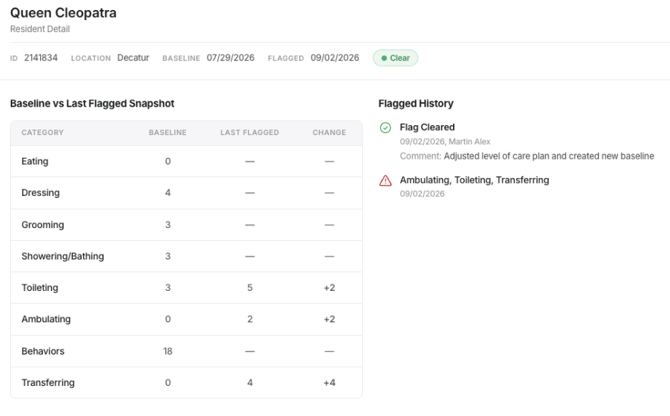
Clearing a flag is recorded for administrative visibility and auditing.
How to View Cleared Flag Details
- Navigate to Administrator.
- Open Lighthouse.
- Go to Resident Details.
- Filter or set the date range appropriately (e.g., to the day the flag was cleared).
- Select the resident entry associated with the cleared flag.
What You Can See in the Log
The resident detail entry includes:
- Whether the flag was cleared
- When it was cleared
- The comment entered during clearing
- The reason the resident was flagged
- A comparison of changes, including:
- The baseline values at the time of flagging
- The updated values showing what changed